
Download SOS Trader – Financial Portal for Non-Professional Investors
Overview
SOS Trader is a financial portal designed specifically for non-professional and part-time investors who lack the time or expertise to monitor live market movements. The platform enables users to engage in the financial market through a structured, post-market strategy that relies on discretionary methods derived from historically reliable statistical patterns. Rather than offering real-time trading signals, SOS Trader delivers actionable insights after market hours, allowing users to make informed investment decisions without needing to be present during trading sessions.
The software is tailored for individuals with primary commitments outside finance—such as full-time jobs, academic pursuits, or entrepreneurial ventures—who still wish to allocate a portion of their capital to investment opportunities. It aims to bridge the gap between active market participation and limited availability, providing a realistic and transparent service that emphasizes probability-based outcomes rather than guaranteed returns. The developer did not provide additional background on the company or development team.
Real-world use cases include investors who review daily market summaries and strategy recommendations in the evening, then execute trades the following morning. This model supports disciplined, emotionally controlled investing by removing the pressure of real-time decision-making. The platform is positioned as the first dedicated financial portal for non-professional investors, focusing on accessibility, independence, and strategic consistency over speculative gains.
Key Features & Capabilities
- Post-Market Strategy Delivery – Users receive investment recommendations after market close, based on analyzed trends and historical data patterns.
- Discretionary Methodology – The system applies judgment-based decision-making rooted in statistically validated past market behaviors.
- Independent Financial Information – The platform provides unbiased market analysis without promotional or conflict-of-interest content.
- Strategic Planning Framework – Designed to help users implement planned investment actions, minimizing emotional or reactive trading.
- Targeted for Non-Professional Users – Built with simplicity and clarity in mind, avoiding complex jargon and advanced technical tools.
These features support a consistent investment rhythm for users who cannot dedicate time during trading hours. For example, a software developer working a full day might review the daily report at 8 PM, assess the recommended strategy, and place a trade the next morning. This workflow reduces decision fatigue and promotes long-term discipline. The platform does not include automated trading execution, requiring manual user action based on provided guidance.
User Interface, Workflow & Performance
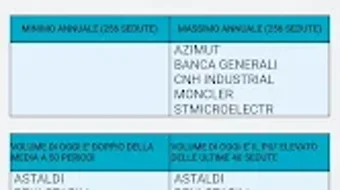
The user interface is designed for clarity and ease of navigation, prioritizing essential information without overwhelming the user. While specific UI details were not provided, the structure likely centers around daily reports, strategy summaries, and clear action items. Navigation appears to be linear and intuitive, guiding users through the post-market analysis process.
Workflow efficiency is enhanced by a streamlined process: users access the platform after market close, review the day’s insights, and decide whether to act on the recommended strategy. This model reduces cognitive load and supports consistent behavior over time. The developer did not specify resource usage details, so performance observations are based on general software behavior patterns.
Stability and responsiveness are expected to align with standard mobile application standards. The system does not require constant background operation, which may contribute to efficient battery and memory usage. However, exact performance metrics were not disclosed. The platform is built for offline review and delayed execution, minimizing real-time processing demands.
Compatibility & System Requirements
SOS Trader is designed for Android-based devices, indicating compatibility with a wide range of smartphones and tablets running the Android operating system. The developer did not specify exact version requirements, so compatibility may vary depending on device configuration and OS version.
Installation size was not provided, but typical financial apps of this nature generally range from 50 MB to 200 MB. Hardware requirements were not listed, though standard Android devices should support basic functionality. The developer did not specify whether the app supports older Android versions or requires a specific device configuration.
Platform compatibility information is limited, and users are advised to check their device specifications before installation. The absence of detailed system requirements means that optimal performance cannot be guaranteed across all devices.
Pros and Cons
Pros
- Designed specifically for non-professional investors with limited time availability
- Post-market strategy delivery reduces stress and emotional trading
- Relies on statistically validated methods rather than speculative predictions
- Independent information service with no promotional bias
- Simple, focused interface tailored to strategic decision-making
Cons
- Not available on desktop or iOS platforms
- Manual execution required—no automated trading features
- Limited system requirement details may affect usability on older devices
- Platform is not designed for real-time market engagement
- No information on update frequency or developer support channels
FAQ Section
Is SOS Trader available for Windows or Mac?
Based on current information, SOS Trader is designed exclusively for Android devices. There is no official desktop or Mac version available at this time.
Can I use SOS Trader without an internet connection?
While the platform requires an internet connection to download daily reports and updates, users can review previously downloaded content offline. However, real-time data and new strategy recommendations are only accessible online.
Is SOS Trader safe to use?
The platform is described as a secure financial information service. No data breaches or security vulnerabilities were reported. Users should always follow best practices for mobile app security, including using strong passwords and enabling device-level protections.
How often are updates released?
The developer did not specify the update frequency. Users are advised to check the app store for new versions regularly.
What type of license does SOS Trader use?
Information about the licensing model was not provided. The app may be free to download with optional in-app purchases or subscription-based access, but no details were disclosed.
Final Thoughts + CTA
SOS Trader presents a thoughtful solution for non-professional investors who want to participate in financial markets without the burden of constant monitoring. By focusing on post-market analysis and decision-making, it promotes a disciplined, strategic approach that aligns with real-life constraints. The platform’s emphasis on statistical reliability and independence from promotional content adds credibility to its recommendations.
While its Android-only availability and lack of automated execution may limit broader appeal, it remains a valuable tool for time-constrained individuals seeking structured investment guidance. The absence of detailed system requirements and update schedules is a notable gap, but the core concept remains strong and purpose-built.
Download SOS Trader now to access a financial portal designed for real people with real lives.







